 Xem Studiomeasured geometry
Library › Hardware › Springs & flexures ·
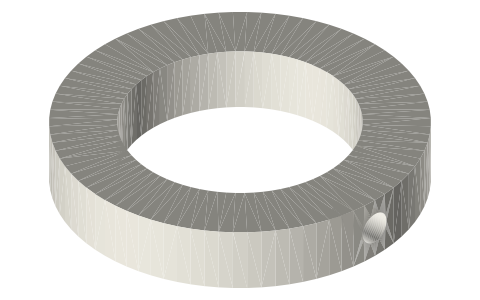
Leaf hub collars: Ø12 and Ø18 bore, M3 grub
How is a flexure leaf's hub held on its rod? · Hardware · basis: Design values of the free-piston generator; M3 grub (ISO 4026) in an Ø2.5 tapped hole
Also called: flexure hub collar, shaft collar grub
Long Earth Society build part. Hub collars of my free-piston generator. Long Earth Society
Exact dimensions. Every file is drawn at true size with no tolerance added. The holes and pins that meet another part are listed below under Mating features, with the fit each joint needs; open those by your process's clearance before making the part. Mating features
- sizes
- 2 in table
Notes
- The leaf's hub is clamped axially between a shoulder and a collar (leaf B: the displacer cap's boss and one Ø20 collar) or between two collars (leaves C and D on the Ø18 tube rod). Each collar holds with one M3 × 4 grub.
- Fit: the collar bores slide on the rod or tube and are held by the grub.
Leaf hub collars: Ø12 and Ø18 bore, M3 grub size chart
| collar | od (mm) | bore (mm) | h (mm) |
|---|---|---|---|
| displacer | 20 | 12 | 5 |
| piston | 28 | 18 | 5 |
Mating features
Drawn at the exact size. Open press, slide, run and socket features by your process's clearance (tolerances by process); leave designed gaps and clamp fits as drawn.
| feature | exact | mates with | fit | files |
|---|---|---|---|---|
| bore | Ø12 / Ø18 | displacer rod / tube rod (M3 grub) | slide | all |
| grub hole | Ø2.5 | M3 tap drill | designed | all |
Where the files are
Other publishers' files are linked, not hosted. "verify" = check the license at the link before commercial use.
| Long Earth Society | Engine builds | web, video | LES site |
Free files
★ Free files 2 parts. Xem Studio design: free to use, print and sell things from; not to be republished as files. Xem Studio Design License. index.json
Use this part in your AI. Your AI gets the exact sizes and files straight from Xem and can design a mount, case or adapter around it. Direct downloads here are limited to one file every 10 minutes; through your AI they are unlimited.
Connect Xem to your AI (free, no account, about a minute)
https://xemstudio.com/mcp- Claude: Add to Claude
- ChatGPT (Plus or higher): open Connectors → Advanced → turn on Developer mode → Create → paste the address, no authentication → Create.
- Cursor: install with one click. VS Code: install with one click.
| fpse-collar-12x20 | collar Ø20 × 5, Ø12 bore, M3 tapped radial hole (Ø2.5): clamps leaf B's hub on the displacer rod against the cap's boss | STEP · STL |
| fpse-collar-18x28 | collar Ø28 × 5, Ø18 bore, M3 tapped radial hole (Ø2.5): two per piston leaf, either side of its hub on the tube rod | STEP · STL |
https://xemstudio.com/mcp to Claude, ChatGPT, Cursor or any MCP client (free, no account, one minute) and it can look up exact sizes, mating fits and free STEP/STL from every chat.Plain text: sheet.txt · JSON: /api/geometry?object=flexure-hub-collars-12-18
Fits with

Questions
How many?
One Ø12 (leaf B) and four Ø18 (leaves C and D).