 Xem Studiomeasured geometry
Library › Hardware › Fasteners ·
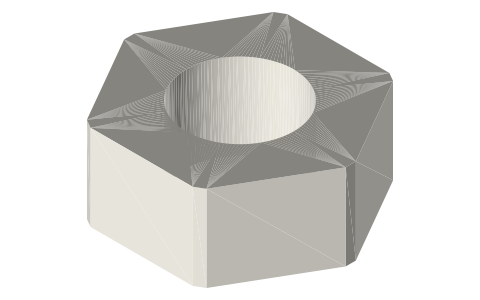
Hex nuts, M2–M8 (ISO 4032)
What size pocket does an M3 nut need in a 3D print? · Hardware · basis: ISO 4032 (DIN 934 matches for M2–M8; they differ at M10 and up)
Also called: m3 nut, hex nut, iso 4032, din 934, nut trap, metric hex nut size chart, tuerca hexagonal medidas, porca sextavada dimensões
Exact dimensions. Every file is drawn at true size with no tolerance added. The holes and pins that meet another part are listed below under Mating features, with the fit each joint needs; open those by your process's clearance before making the part. Mating features
- sizes
- 7 in table
Notes
- Width across flats (AF) and thickness per size below. A nut trap is drawn at the nut's AF and thickness; the corner-to-corner dimension is AF × 1.155.
- M3: 5.5 AF, 2.4 thick; the trap is drawn 5.5 AF × 2.4 deep.
Hex nuts, M2–M8 size chart
| thread | width af (mm) | corner (mm) | thickness (mm) |
|---|---|---|---|
| M2 | 4 | 4.6 | 1.6 |
| M2.5 | 5 | 5.8 | 2 |
| M3 | 5.5 | 6.4 | 2.4 |
| M4 | 7 | 8.1 | 3.2 |
| M5 | 8 | 9.2 | 4.7 |
| M6 | 10 | 11.5 | 5.2 |
| M8 | 13 | 15 | 6.8 |
Mating features
Drawn at the exact size. Open press, slide, run and socket features by your process's clearance (tolerances by process); leave designed gaps and clamp fits as drawn.
| feature | exact | mates with | fit | files |
|---|---|---|---|---|
| hex | AF × m (M3 5.5 × 2.4) | nut trap | press | nut-* |
| bore | thread major (M3 Ø3) | screw shank model | designed | nut-* |
Where the files are
Other publishers' files are linked, not hosted. "verify" = check the license at the link before commercial use.
| McMaster-Carr | Hex nuts (free STEP/IGES/STL per part, for your own design use; no redistribution) | STEP, IGES, STL, PDF | McMaster-Carr site terms: personal design use, no redistribution verify |
| Wikipedia | Nut (hardware) | web | CC BY-SA 4.0 (text) |
Free files
★ Free files 7 parts. Generated by Xem Studio from the standard; threads are plain cylinders at major diameter. CC BY 4.0. index.json
Use this part in your AI. Your AI gets the exact sizes and files straight from Xem and can design a mount, case or adapter around it. Direct downloads here are limited to one file every 10 minutes; through your AI they are unlimited.
Connect Xem to your AI (free, no account, about a minute)
https://xemstudio.com/mcp- Claude: Add to Claude
- ChatGPT (Plus or higher): open Connectors → Advanced → turn on Developer mode → Create → paste the address, no authentication → Create.
- Cursor: install with one click. VS Code: install with one click.
| nut-m2 | ISO 4032 M2: 4.0 AF × 1.6, thread as Ø2.0 plain bore | STEP · STL |
| nut-m2.5 | ISO 4032 M2.5: 5.0 AF × 2.0, thread as Ø2.5 plain bore | STEP · STL |
| nut-m3 | ISO 4032 M3: 5.5 AF × 2.4, thread as Ø3.0 plain bore | STEP · STL |
| nut-m4 | ISO 4032 M4: 7.0 AF × 3.2, thread as Ø4.0 plain bore | STEP · STL |
| nut-m5 | ISO 4032 M5: 8.0 AF × 4.7, thread as Ø5.0 plain bore | STEP · STL |
| nut-m6 | ISO 4032 M6: 10.0 AF × 5.2, thread as Ø6.0 plain bore | STEP · STL |
| nut-m8 | ISO 4032 M8: 13.0 AF × 6.8, thread as Ø8.0 plain bore | STEP · STL |
https://xemstudio.com/mcp to Claude, ChatGPT, Cursor or any MCP client (free, no account, one minute) and it can look up exact sizes, mating fits and free STEP/STL from every chat.Plain text: sheet.txt · JSON: /api/geometry?object=hex-nuts-metric
Fits with
Questions
What size is an M3 nut?
5.5 mm across flats, 6.4 mm across corners, 2.4 mm thick (ISO 4032). A trap for it is drawn 5.5 mm across flats and 2.4 mm deep.
What size is an M4 nut and M5 nut?
M4: 7 mm across flats, 3.2 mm thick. M5: 8 mm across flats, 4.7 mm thick. Across corners = AF × 1.155.
How to model a captive nut pocket in a 3D print?
Draw the hex pocket at the nut's AF and thickness, apply your press allowance to it, slot it in from the side so the nut can't spin, and keep at least 1.5 mm of wall around the corners.