 Xem Studiomeasured geometry
Library › 3D printing › Print-in-place mechanisms ·
Print-in-place: push button with flexure return and click
How do you 3D print a spring-loaded push button with a click? · Hardware · basis: Xem Studio design: compliant (flexure) mechanism, planar; one designed running gap of 0.40 mm
Also called: print in place button, compliant push button, 3d printed button with spring, flexure button stl, clicky button print
Exact dimensions. True size, with no tolerance added.
- length
- 52.0 mm
- width
- 48.0 mm
- height
- 8.0 mm
Notes
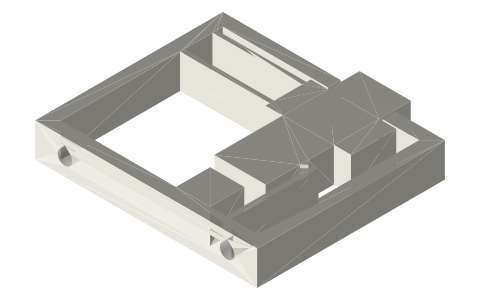
- 3D print in place — prints already assembled, moving, in one job. Drawn at true size with no printer tolerance added; the 0.40 mm running gaps are part of the design.
- Running gap 0.40 mm per side, 0.80 mm on diameter — part of the design, drawn as is. On the 45° faces the same 0.40 mm is measured square to the face (0.57 mm along the axis).
- Bed: flat, everything 8 mm tall straight up from the bed: housing, plunger, flexures and click arm are one printed part with 0.40 mm slots between the moving and fixed edges.
- Support while printing: none needed — a straight extrusion; the two mounting holes through the bottom wall are teardrops.
- Captured: the plunger hangs on two parallel flexure beams (21 × 1.0 × 8) from the housing's left wall; its shoulder sits 0.40 mm under the housing top, so it cannot come out, and a block 3.0 mm below it is the hard stop.
- Freeing it: press the plunger fully a few times; the first press clears any strands in the 0.40 mm slots.
- Motion: 3 mm of travel; the tooth on the plunger meets the bump on the click arm at 1.4 mm, pushes the arm 0.6 mm aside and snaps past at 2 mm (a click, and a second one on the way back); the flexures return the plunger. Beam shortening shifts it 0.26 mm sideways at full travel.
Print-in-place: push button with flexure return and click size chart
| key | value | what |
|---|---|---|
| gap_mm | 0.4 | running gap per side on every moving interface (radial, axial, under captured parts) — part of the design, not a tolerance |
| housing_mm | 52 × 44 × 8 | outside |
| plunger_w_mm | 12 | where it leaves the housing (opening 12.8) |
| plunger_out_mm | 4 | above the housing at rest |
| travel_mm | 3 | to the hard stop |
| click_contact_mm | 1.4 | travel where the plunger's tooth meets the click bump |
| click_mm | 2.0 | travel where the tooth snaps past the bump |
| click_overlap_mm | 0.6 | how far the bump arm is pushed aside |
| flexure_l_mm | 21.0 | two parallel beams |
| flexure_t_mm | 1.0 | beam thickness (in the plane) |
| flexure_h_mm | 8.0 | beam height = print height |
| side_drift_mm | 0.26 | plunger's sideways shift at full travel from beam shortening (0.6 d²/L), inside the 0.40 gap |
| up_stop_mm | 0.4 | shoulder under the housing top: the plunger cannot be pulled out |
| mount_holes | 2 × Ø3.4 through the bottom wall | teardrop |
Where the files are
Other publishers' files are linked, not hosted. "verify" = check the license at the link before commercial use.
| Xem Studio | Print-in-place mechanism design (geometry computed in the generator) | web | Xem Studio design |
Free files
★ Free files 2 parts. Xem Studio design: free to use, print and sell things from; not to be republished as files. Xem Studio Design License. index.json
Use this part in your AI. Your AI gets the exact sizes and files straight from Xem and can design a mount, case or adapter around it. Direct downloads here are limited to one file every 10 minutes; through your AI they are unlimited.
Connect Xem to your AI (free, no account, about a minute)
https://xemstudio.com/mcp- Claude: Add to Claude
- ChatGPT (Plus or higher): open Connectors → Advanced → turn on Developer mode → Create → paste the address, no authentication → Create.
- Cursor: install with one click. VS Code: install with one click.
| print-in-place-push-button-flexure-assembly | The whole print as laid on the bed (1 bodies, already assembled); STEP keeps each moving body a separate solid | STEP · STL |
| print-in-place-push-button-flexure-button | Housing, plunger, flexure beams and click arm: one part | STEP · STL |
https://xemstudio.com/mcp to Claude, ChatGPT, Cursor or any MCP client (free, no account, one minute) and it can look up exact sizes, mating fits and free STEP/STL from every chat.Plain text: sheet.txt · JSON: /api/geometry?object=print-in-place-push-button-flexure
Fits with



Questions
What makes it spring back?
Two parallel flexure beams 21 mm long and 1.0 mm thick join the plunger to the housing; pressing bends them, and they straighten again when released.
Where does the click come from?
A 45° tooth on the plunger has to push a bump on a thin cantilever 0.6 mm aside; it snaps past it at 2.0 mm of the 3.0 mm travel.