 Xem Studiomeasured geometry
Library › Joinery › 3D-print connectors ·
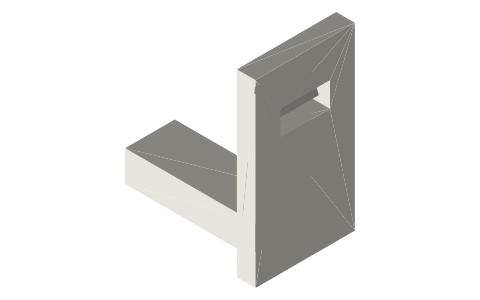
Snap-fit cantilever joint (hook and catch)
How do you design a snap-fit for 3D printing? · Hardware · basis: Xem Studio design — geometry computed in the generator from traditional proportions
Also called: snap fit, snap fit 3d printing, cantilever snap fit, snap fit design, snap fit dimensions, 3d printed clip, snap-fit joint, encaje a presión, unión a presión, Schnappverbindung, Schnapphaken
Exact dimensions. True size, with no tolerance added.
- length
- 25.0 mm
- width
- 16.0 mm
- height
- 29.0 mm
Notes
- Woodworking joint drawn for 3D printing: the parts lock together by shape, so a print can be joined without glue or screws. Drawn at true size with the parts line to line (zero gap) in their assembled position — add your printer's fit allowance to the mating faces (your AI or slicer can do this).
- The basic printed snap: a cantilever arm with a hook that springs into a window. Keep the arm's strain low: for PLA/PETG the undercut should be no more than about 6–7 % of the arm length.
- Print the arm along its length in the plane of the bed — layer lines across the arm make it snap.
Snap-fit cantilever joint size chart
| dimension | value |
|---|---|
| stock | 2 mm arm, 8 mm wide, 18 mm long |
| parts | hook part, catch part |
| hook | 1.2 mm undercut, 30° lead-in |
| assembles | push in: the arm flexes and the hook clicks into the window |
| holds | pulling apart until the hook is pressed back |
Where the files are
Other publishers' files are linked, not hosted. "verify" = check the license at the link before commercial use.
| Xem Studio | Joinery design (geometry computed in the generator from traditional proportions) | web | Xem Studio design |
Free files
★ Free files 3 parts. Xem Studio design: free to use, print and sell things from; not to be republished as files. Xem Studio Design License. index.json
Use this part in your AI. Your AI gets the exact sizes and files straight from Xem and can design a mount, case or adapter around it. Direct downloads here are limited to one file every 10 minutes; through your AI they are unlimited.
Connect Xem to your AI (free, no account, about a minute)
https://xemstudio.com/mcp- Claude: Add to Claude
- ChatGPT (Plus or higher): open Connectors → Advanced → turn on Developer mode → Create → paste the address, no authentication → Create.
- Cursor: install with one click. VS Code: install with one click.
| snap-fit-cantilever-joint-hook-part | Part with the cantilever arm and hook | STEP · STL |
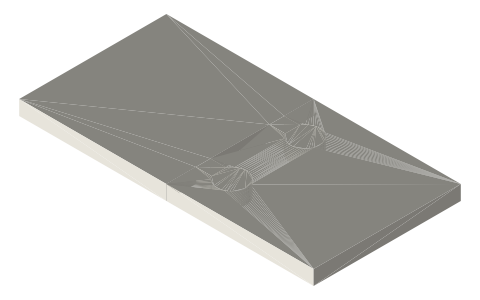
| snap-fit-cantilever-joint-catch-part | Mating wall with the catch window | STEP · STL |
| snap-fit-cantilever-joint-assembled | All parts in their assembled position (each part its own solid) | STEP · STL |
https://xemstudio.com/mcp to Claude, ChatGPT, Cursor or any MCP client (free, no account, one minute) and it can look up exact sizes, mating fits and free STEP/STL from every chat.Plain text: sheet.txt · JSON: /api/geometry?object=snap-fit-cantilever-joint
Fits with
Questions
How long should a snap-fit arm be?
Long enough that the hook undercut is a small share of its length: 18 mm for a 1.2 mm hook here.
Which way should a snap-fit be printed?
With the arm lying flat along the bed, so the layers run along the arm.